

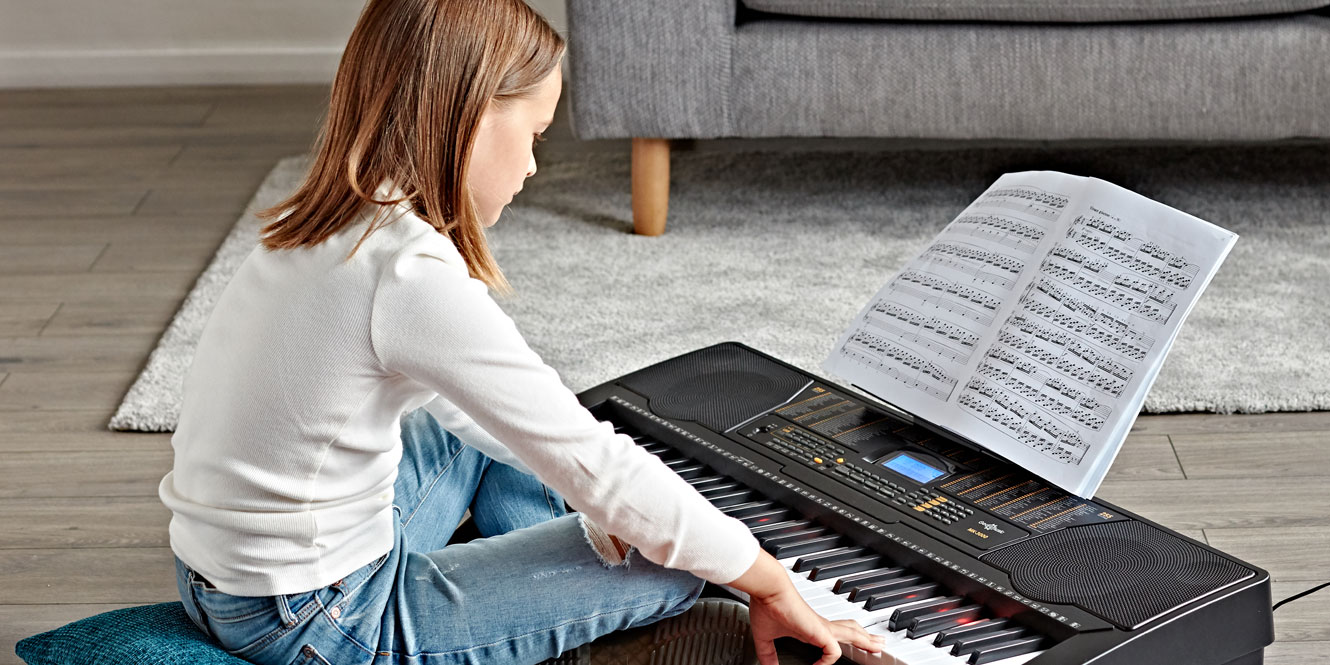

Learning the keyboard or piano can be extremely beneficial for a child who shows an interest in music. It allows them to get a feel for the keys, decide whether the piano will become their main instrument, and pick up the foundations of music theory. Plus, it’s also super fun to play – especially with all the cool sounds, songs, and app compatibility that come with many modern keyboards.
If your child does choose to learn the piano, the benefits are fantastic. It can improve their hand-eye coordination and help build social and teamwork skills through ensemble playing.
You may be wondering what keyboard your child should start with. Kids learn at different rates and have their own preferences, so one piano/keyboard may not suit all! Some kids may want one that has a fun design and a range of sounds; others may prefer a more professional-looking instrument with a premium piano voice.
We’re here with our list of the best keyboards for kids and beginners to help you choose. We’ve included a mix that ranges from vibrant, eye-catching instruments to ones that finely replicate the feel and sound of acoustic pianos.

In a hurry?
Here are our top three keyboards/pianos!
| VISIONKEY-1 37 Key Portable Mini Keyboard | Colourful and extremely portable | Check the current price |
| Yamaha Piaggero NP15 Portable Digital Piano | Detailed piano sounds with AWM sampling | Check the current price |
| Casio CT S300 | A fun portable keyboard with a dance mode! | Check the current price |
Best keyboards for kids and beginners
1. VISIONKEY-1 37 Key Portable Mini Keyboard
Colourful and extremely portable
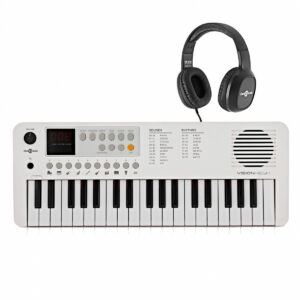 Number of keys: 37
- Polyphony: 32
- In-built sounds: 100
- Battery powered: Yes
- Other features: 100 rhythms, 30 songs
- Connections: USB C (for charging)
- Weight: 95kg
- Dimensions: 545 x 95 x 245 mm
Pros
- Extremely small and portable – ideal for kids and travelling
- Plenty of sounds, rhythms, and songs for such a small instrument
- Plug into anything thanks to USB-C connectivity
Cons
- Small size and keys may not be suitable for some players
- Older children may prefer something that feels a bit more “grown-up”
Specifically designed for young music enthusiasts, the VISIONKEY-1 is a compact, lightweight keyboard that features 37 mini keys perfectly sized for smaller hands. This isn’t just a toy; it’s an instrument that grows with your child, offering over three octaves to support their evolving skills.
Packed with 100 sounds and rhythms, plus 30 songs, the VISIONKEY-1 ensures endless creative exploration. Its 32-note polyphony allows children to try everything from simple melodies to complex chord voicings while improving their timing with the handy built-in metronome.
Concerned about noise? The VISIONKEY-1 includes a 1W speaker and headphone output, so practice sessions can be as public or private as you’d like. Power it up using the included USB-C cable or four AA batteries for musical fun wherever you go. Its travel-friendly design, weighing just under 1kg, makes it the perfect companion for holidays or long car rides. Plus, it comes in a variety of cool colours!
2. Yamaha Piaggero NP15 Portable Digital Piano
Detailed piano sounds with AWM sampling
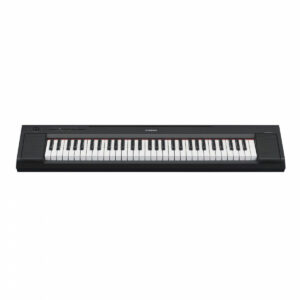 Number of keys: 61
- Polyphony: 64
- In-built sounds: 15
- Battery powered: Yes
- Other features: 15 voice demo songs, 10 piano preset songs, reverb, dual, sound boost, metronome
- Connections: Headphone output, USB MIDI/audio, sustain pedal
- Weight: 5.2kg
- Dimensions: 1,052 x 104 x 260 mm
Pros
- Effortless to carry around
- Perfectly suited to beginners and children
- Superior sound in a small package
Cons
- Limited range of keys
The Yamaha Piaggero NP15 Portable Digital Piano has a lightweight and minimalist design. It’s easy to carry around, whether you’re going to piano lessons or taking to the stage. But don’t let its small size fool you – this piano packs a punch with its sound quality.
The lighter key action ensures that beginners and kids can play for longer periods without tiring, while still maintaining a satisfying feel. Despite its compact form, the NP15 boasts a sound that rivals full-sized pianos, thanks to the high-quality Yamaha CFIIIS Concert Grand samples.
Another standout feature is the app connectivity, which opens up a world of additional features and creative possibilities. With the Yamaha Smart Pianist app, you can adjust the settings of your piano remotely and view the scores of the pieces you’re playing. It makes life that much easier when you want to focus on the music!
While it has a limited number of keys (61), this isn’t a major drawback for beginners. In fact, it can make learning less daunting, providing just enough scope to develop skills without seeming overwhelming.
3. Casio CT S300 Portable Keyboard
Dance mode unlocks your child’s creativity
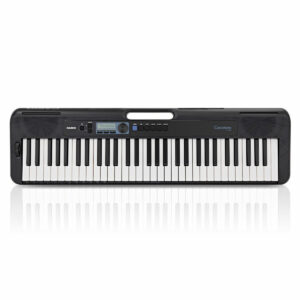 Number of keys: 61
- Polyphony: 48
- In-built sounds: 400
- Battery powered: Yes
- Other features: 60 songs, effects,
- Connections: Headphone output, USB MIDI, sustain pedal, dance mode
- Weight: 3kg
- Dimensions: 930 x 73 x 256 mm
Pros
- Built-in handle makes this very portable
- Dance mode encourages experimentation
- Casio Music Space app connectivity
Cons
- Power supply has to be purchased separately
- 61 keys may be too few for some
The Casio CT S300 Portable Keyboard is a fantastic musical companion for kids. With its lightweight design and handle, it’s incredibly easy to carry around, allowing children to take their music wherever they go.
What makes the CT S300 truly special is its array of features designed to inspire creativity while making learning fun. It offers 400 sounds, 60 songs, and free online lessons from Casio, providing a comprehensive musical experience. Kids can connect their devices to access the educational features of the Casio Music Space app, making learning more interactive and engaging.
The keyboard also includes a Dance Music Mode, letting kids create their own dance tracks across different genres. With its user-friendly design and educational benefits, the Casio CT S300 is the perfect instrument to ignite a lifelong love of music in children.
4. Kawai ES60 Digital Stage Piano
Responsive Hammer Lite action for a quiet, realistic key feel
 Number of keys: 88
- In-built sounds: 17
- Battery powered: No
- Other features: Dual and Split modes, 3 types of reverb, speaker EQ, 30 drum patterns, compatible with the PianoRemote app
- Connectivity: Headphone output, USB-MIDI, Line Out
- Weight: 11kg
- Dimensions: 1,295 (W) x 260 (D) x 150 (H) mm
Pros
- Authentic acoustic piano-style feel
- High-quality, detailed piano tones
- Simple to connect to apps and software
Cons
-
Lacks built-in accompaniment features
The Kawai ES60 is a no-fuss, brilliantly built, solid starting point that’s designed to make a real difference to early progress. Its Responsive Hammer Lite keyboard provides the weight and feedback of a traditional piano, which is important for developing good technique. With advanced cushioning, the keys are soft and quiet to press – it’s a small but thoughtful feature that really adds to the premium feel of the piano. It also means you can practise without disturbing others.
Sound-wise, you have the Shigeru Kawai SK-EX. This is one of Kawai’s top-tier grand pianos, and the ES60 captures its tonal character beautifully. There’s plenty of variety too, including organs, strings, and electric piano sounds, which keep things interesting for younger players.
At just 11kg, the ES60 might not be as light as other options on this list, but for a stage piano, it’s still easy to move between rooms or take it to lessons. Plus, the onboard 20W speakers are surprisingly powerful for such a lightweight instrument, and their positioning ensures good, well-projected sound, whether it’s on a stand or a table.
With USB-MIDI and Line Out options, connecting to software, apps, or external gear is quick and easy. If you or your child wants to explore digital tools and record their progress, the ES60 is a great option to try.
5. K1+ 61-Note Key-Lighting Keyboard with Bluetooth by Gear4music
Light-up keys make this great for learning music
 Number of keys: 61
- In-built sounds: 300
- Battery powered: Yes
- Other features: LED display, 300 rhythms, 80 songs
- Connections: USB-C MIDI/Audio, Bluetooth, 6.35mm TS Sustain Pedal Input, 3.5mm TRS Headphone Output
- Weight: 3.5kg
- Dimensions: 92 (H) x 916 (W) x 305 (D) mm
Pros
- Light-up keys support learning and practice
- Drum pads and auto-accompaniment built in
- Compact, lightweight, and easy to move
Cons
-
No built-in lesson mode or display
If you’re looking for a fun and engaging way to introduce music to your child, the K1+ is ideal. The 61 velocity-sensitive keys respond to how softly or firmly you play, helping young players start to develop dynamic control from day one.
One of its most helpful tools is the key-lighting system. As each key lights up to guide what note to play next, it gives beginners a clear visual cue to follow. There’s also plenty of room for creativity. With 300 onboard sounds and an equal number of rhythms with auto-accompaniment, there’s a lot to explore. The built-in drum pads are a nice touch, too, letting kids add beats and play with rhythm hands-on.
Better still, Bluetooth audio streaming makes it easy to play along with favourite songs or use music apps. And at just 3.5kg with a carry handle, the K1+ is simple to set up and move around — whether it’s for bedroom practice or a school performance.
6. VISIONKEY-100 Portable Digital Keyboard Piano
Bluetooth enabled for playing along to your own music
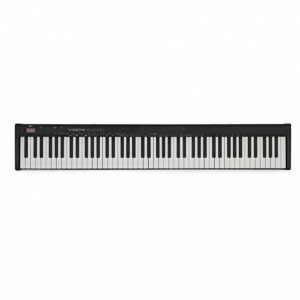 Number of keys: 88
- In-built sounds: 129
- Battery powered: No
- Other features: 128 rhythms, 30 songs, Bluetooth
- Connections: Headphone output, microphone input, Line in, sustain pedal
- Weight: 85kg
- Dimensions: 1234 x 67 x 210 mm
Pros
- Full sized keyboard is ideal for learning the piano on
- Bluetooth allows you to play music through your keyboard’s speakers
- Mic and sustain inputs allow you to explore creative music making
- Slim profile is great for portability
- USB-C allows for versatile powering options
Cons
- Not battery powered
- No MIDI connections – your child may want to control other instruments
This friendly, fun, and versatile instrument is perfect for people just starting their musical journey. With 88 full-size velocity-sensitive keys spanning over seven octaves, the VISIONKEY-100 is an excellent stepping stone for kids transitioning to larger instruments. It has 129 different sounds and 128 rhythms, encouraging the exploration of different timbres and musical feels.
Bluetooth connectivity is a very useful feature as it allows you to connect your devices and play along to your favourite songs. With a microphone input and headphone output, your child can even sing along or practise in peace without disturbing others.
The lightweight design and USB-C power make it super easy to set up and move around, fitting perfectly in a child’s room or family space. The LED screen keeps everything clear and user-friendly, enhancing your child’s learning experience.
7. Casio CT X700 Portable Keyboard
AiX sound source produces lifelike sounds
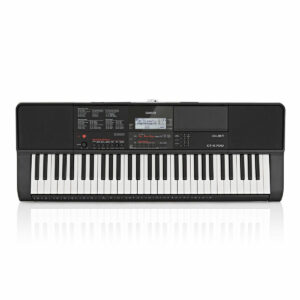 Number of keys: 61
- Polyphony: 48 (24 for certain sounds)
- In-built sounds: 600
- Battery powered: Yes
- Other features: 160 songs, 10 user recorded songs, 195 rhythms, effects
- Connections: Headphone output, USB MIDI, sustain pedal, aux in
- Weight: 3kg
- Dimensions: 948 x 350 x 109mm
Pros
- AiX sound source replicates real acoustic piano sounds
- Built-in lesson functions
- Record your own compositions and connect via USB
Cons
- Only 61 keys
- No BlueTooth
This fun and friendly instrument is perfect for children who are eager to explore their musical talents. With over 600 tones and 190 styles, kids can experiment with a wide range of sounds and rhythms.
The heart of the Casio CT X700 is the AiX sound source, designed to produce professional sounds, adding a touch of realism to any performance. Children can also adjust touch sensitivity, reverb, and pitch to suit their individual style.
What’s more, the CT X700 features built-in piano lessons and a song bank with over 150 songs, making learning both interactive and enjoyable. Kids can even record their compositions and connect the keyboard to a computer or other devices via MIDI and USB.
8. Yamaha EZ310 61 Key Lighting Keyboard
 Light-up keyboard and Yamaha’s “Keys to Success” make learning fun and easy
- Number of keys: 61
- Polyphony: 48
- In-built sounds: 650
- Battery powered: Yes
- Other features: 260 preset styles, 152 preset songs, Dual and Split functions
- Connections: Headphone output, USB MIDI, sustain pedal, aux in
- Weight: 4.6 kg
- Dimensions (W x H x D): 941 x 105 x 317 mm
Pros
- Interactive learning features make starting out very enjoyable
- Huge selection of sounds available
Cons
- Quite low polyphony compared to similar instruments
The Yamaha EZ310 61 Key Lighting Keyboard might be small and lightweight, but it’s packed with an impressive library of 650 high-quality instrument voices, allowing your child to explore a wide range of sounds and styles.
One of the best features of the EZ310, though, is its light-up keys. Not only are these fun to play, but they also go a long way in helping beginners navigate and get to know the keyboard layout. And when they want something fun to play beyond those exam pieces, there are 152 preset songs to choose from, from chart-topping hits to timeless classics,
Yamaha’s “Keys to Success” lessons make the learning process even easier – and way more fun. This program breaks songs down into manageable sections, teaching in a structured, enjoyable way. But the best part is that it provides real-time feedback, great for keeping your child motivated. Plus, the EZ310 has a USB audio/MIDI interface for recording via a computer, meaning you can plug in and capture performances or create compositions.
9. Roland E-X50 Arranger Keyboard
Great introductory arranger keyboard
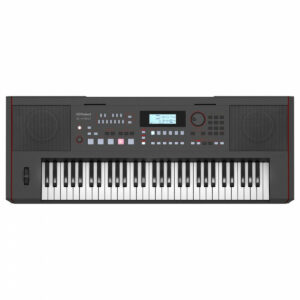 Number of keys: 61
- Polyphony: 256
- In-built sounds: 689
- Battery powered: No
- Other features: 202 songs, lesson features
- Connections: Headphone output, USB MIDI, sustain pedal, aux in
- Weight: 6kg
- Dimensions: 1,048 x 461 x 319 mm
Pros
- Affordable introduction to arranger keyboards
- Bluetooth audio functionality
- Connect instruments and microphones for performances
- Play with a full band with just your keyboard
Cons
- Advanced features may require a bit of a learning curve
- No specific bundled lessons
- Quite a heavy keyboard
This modern powerhouse is packed with premium sound quality, advanced accompaniment features, and Bluetooth audio capability. Its stylish design makes it a perfect fit for both home and stage performances.
The Roland E-X50 Arranger Keyboard offers rich and expressive piano sounds, along with 700 additional tones, making it a fantastic playground for young composers. The keyboard also includes a microphone input with onboard vocal effects, adding an extra layer of fun for kids who love to sing!
Even better, the powerful speakers ensure that every note comes out clear and strong, while the auto-accompaniment feature lets your child command a full band with their left hand.
With the ability to stream songs and lessons directly via Bluetooth, learning is as interactive as it gets. And thanks to Roland’s Style Converter software, your child can customise arrangements, taking creativity to a whole new level.
How to choose the best keyboard for your child
Number of keys
The first thing you’ll want to consider is the number of keys. A full keyboard has 88 keys – and this is the standard for all piano players at an intermediate level or above. Your child, however, may not need a full-sized keyboard straight away. They may not be big enough to reach across the whole instrument, or the pieces they’re learning just don’t require that number of keys. Assess how large they need the instrument to be and go from there.
Keyboard action
The action of a piano is how the keys feel under your fingers. The standard for a full piano is “hammer action”, which replicates the feeling of the keys in an acoustic instrument. This might not be necessary for your child, though; they may want an unweighted keyboard if they don’t have the strength or technique to press weighted keys down yet.
Hammer action pianos are also much heavier than their unweighted equivalents. If your child needs their instrument to be portable, you might want to avoid fully weighted hammer action. But if they plan to keep the keyboard for a long time and want to build proper technique, we recommend weighted keys. Check out our guide to the best digital pianos with weighted keys for ideas.
Sound quality
It probably doesn’t need to be said, but of course, anyone would want good sound quality in a digital piano or keyboard! A great piano tone can replicate all the nuances in your piano playing much more accurately. Fortunately, many modern pianos and keyboards across all price points have decent-quality piano sounds in them.
Budget
Price is maybe the most important factor for many people. You don’t necessarily want to drop a huge amount of money if you’re unsure your child may want to pursue music forever. Thankfully, the piano and keyboard are such common instruments that there are countless budget options available.
The best brands
On this list, we’ve selected the best piano brands for kids and beginners. We’ve chosen these brands because they offer great value for money, innovative designs, and great educational features such as dual or split modes and app compatibility.
Yamaha has “Flowkey”, which is an online interactive learning resource for piano; many of their pianos come with a free trial to this. Casio has a similar app, Casio Music Space. This app also offers interactive learning resources, as well as the ability to connect with your instrument via Bluetooth to interact with it. To learn more, have a read of our guide to the best piano brands.
What is a velocity-sensitive keyboard?
A velocity-sensitive keyboard can detect how fast you press down a key. Faster velocities usually translate to a louder volume; lower velocities mean a quieter volume. This is great for teaching children how to control their touch on the keyboard in order to play expressively.
Methods for learning the piano/keyboard
There are many ways to learn piano and keyboard. You can use workbooks, take online lessons, attend in-person lessons, or even teach yourself. All these methods have their benefits and drawbacks. It can be hard to figure out which is best. We have a helpful article here that will give you an overview of the best methods for learning the piano.
What’s the best age to start?
You can start learning the piano at any age! However old you are, there are countless benefits that come with playing an instrument. However, the best age is between six and nine years old, as this is when children tend to have developed enough hand-eye coordination, motor skills, and discipline to apply themselves to learning the instrument. To find out more, see our guide to the best age to learn.
Accessories you need
Many of these keyboards will work straight out of the box, but there are plenty of accessories that will make your or your child’s life easier. Stands are a great one to start with as they allow you to put your instrument wherever you need it, many are also foldable, so you can take them with you to lessons or gigs. A stool is also important! You can also get stools which fold to match the stand.
Headphones are a necessity if you want to practise silently. Most of the keyboards on this list will have headphone jacks for you to plug into. The smaller ones may not, but their speakers are usually not loud enough to really bother anyone!
Pedals are a nice extra for adding a bit more expression to your playing. Most sustain pedals all use a standard jack-style connector. So if your keyboard has a pedal input, you can use one.
Cables are a must-have for any musician who plays electronic instruments. You can plug into speakers or PA systems or use USB cables to connect to your computer. We stock a wide selection of cables in a variety of lengths.
Many of the pianos and keyboards on this list, and on our website, are available in bundles. These will have many of the accessories mentioned for a great price!

FAQs
What is the best keyboard for beginners and kids?
The best keyboard for kids depends on your child’s personality and what they want from a keyboard. Some may prefer a colourful toy-like instrument which encourages them to play, while others may prefer a more “serious” looking instrument that feels like something a professional would use.
Is the keyboard good for kids?
The keyboard is great for kids! Keyboards have loads of sounds that are lots of fun to play around with, they often have features which encourage learning, and they are often small and portable.
Should a child learn on a piano or keyboard?
Usually, it’s recommended for children to start on a keyboard. Keyboards aren’t as heavy as a piano, making it easier for your child to carry them around. Keyboards generally have lighter key-actions than pianos, this is better if you haven’t built up the strength to play with a weighted keyboard. Some keyboards also have fewer keys and smaller keys, this fits the size of a child’s hands and arms better.
Final thoughts
The best keyboards for kids and beginners are ones that inspire creativity, make it fun to learn, and accommodate developing skills. Whether you’re shopping for yourself or a child, we hope you’ve found the perfect option on this list!


0 Comments