



Cubase has been a staple of music production for decades, building its reputation on powerful MIDI editing, recording, and mixing tools. But with each new version, there’s an important question: how much better can it get?
In this Cubase 16 review, we’re exploring Steinberg’s latest features, including Instrument Stacks, improved Stem Separation, new MIDI tools, and a more streamlined production workflow. In essence, Cubase 16 focuses on making music production faster, more flexible, and more creative, with improvements designed to help you spend less time navigating menus and more time making music.
But is there enough here to justify upgrading from Cubase 15?

In a hurry? Here’s my verdict
Cubase 16 introduces some genuinely interesting improvements, particularly for producers who spend a lot of time programming instruments, editing MIDI, and manipulating audio.
Instrument Stacks, expanded Stem Separation, and simplified Tempo Detection are among the most promising additions, while new effects and workflow refinements improve the overall package.
| Pros | Cons |
|---|---|
| Instrument Stacks simplify layering multiple instruments | Some improvements may feel incremental to existing Cubase 15 users |
| Improved Stem Separation offers six categories | Quick Help doesn't yet cover every function |
| New tools for mixing specific instruments, including VocalTouch and DrumChain | |
| Faster Tempo Detection and improved audio editing | |
| Improved compatibility with Waves Illugen, Ableton Link, and MIDI 2.0 |
Cubase 16 review
Initial thoughts
Cubase 15 introduced plenty of creative functionality, including a Melodic Pattern Sequencer, Stem Separation, and additional modulation tools. Rather than completely reinventing the DAW, Cubase 16 builds on these foundations, expanding several existing features while addressing everyday workflow frustrations.
What’s obvious from this update is that Steinberg have balanced improvements between creative tools and practical updates.
Instrument Stacks make it easier to combine multiple instruments without complicated MIDI routing, while the redesigned Settings workspace brings previously scattered configuration options together. Improvements to Stem Separation, MIDI editing, and Tempo Detection also suggest a greater emphasis on getting ideas into your projects quickly.
There are plenty of smaller updates worth exploring, too. Expanded effects routing, improved drag-and-drop functionality and additional Drum Maps and Mastering Presets might not grab the headlines, but they could make a substantial difference during larger sessions.
Another welcome development is Cubase 16’s effort to improve accessibility. New Quick Help functionality and a Guided Tour provide additional support for musicians getting familiar with the DAW.
Overall, my initial thoughts are that Cubase 16 is a refinement of an already comprehensive production environment rather than a dramatic redesign. That’s not necessarily a bad thing, particularly if the improvements make the tools you already use more efficient.
Instrument Stacks
Instrument Stacks are one of Cubase 16’s most significant new additions, providing a much easier way to combine multiple virtual instruments into a single playable sound.
Layering instruments is nothing new to Cubase. Previously, however, combining several instruments could require you to create multiple tracks, configure MIDI routing, and manage their individual settings.
Instrument Stacks bring these elements together into a unified workflow, allowing you to combine VST instruments, Sampler Tracks, and Drum Tracks, all controlled from one playable track.
For example, imagine building a cinematic sound with a warm synthesizer pad, a sampled piano, and a textured atmospheric layer. Instead of managing each instrument separately, you can combine them into an Instrument Stack and play everything together.
More importantly, you aren’t limited to triggering every instrument simultaneously.
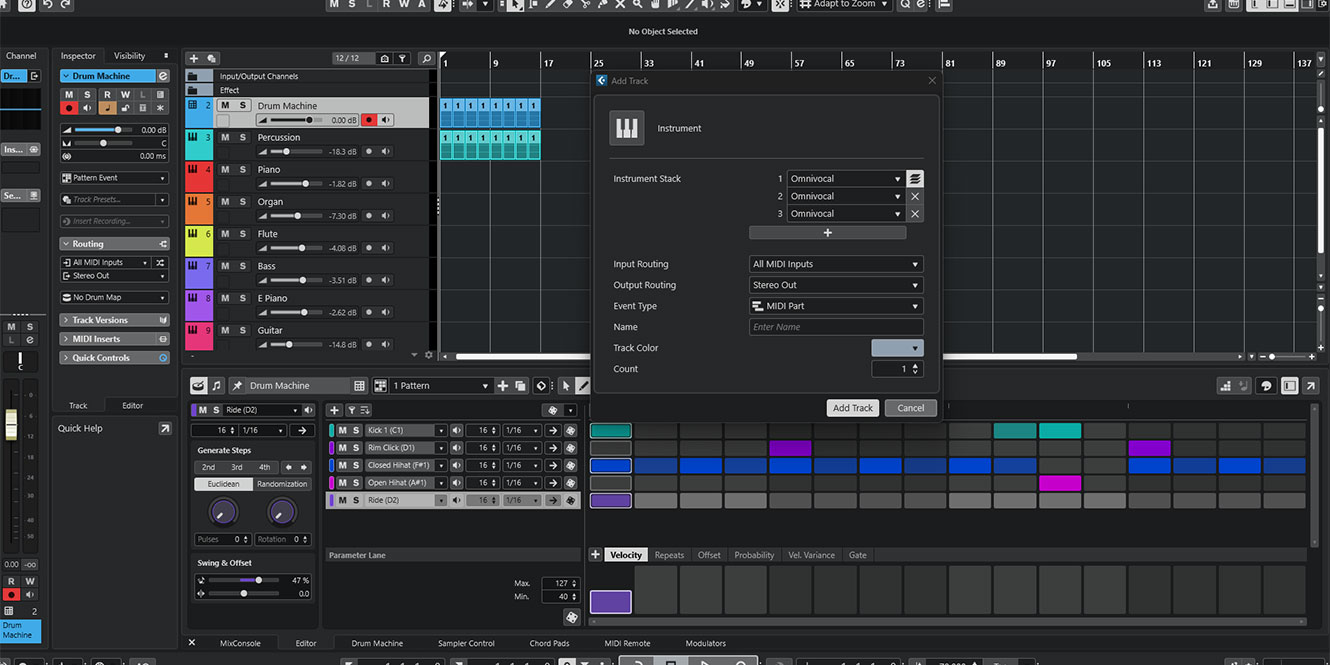
Each layer has independent key and velocity ranges, alongside transposition and other controls. This means you could build a keyboard performance that triggers bass sounds across the lower octaves, piano in the middle, and atmospheric textures towards the top.
Velocity settings also offer interesting possibilities. You could programme a patch that responds differently depending on how hard you play, producing more expressive, dynamic performances.
Another cleverly designed feature is the ability to save Instrument Stacks as presets. Once you’ve created a combination you like, you can recall it in another project without rebuilding everything.
Instrument Stacks show how Cubase 16 solves real-world problems users — particularly those working with complex arrangements — face.
Improved Stem Separation
Stem Separation was introduced in Cubase 15, giving producers the ability to extract individual elements from existing recordings without leaving the DAW.
It was a useful addition, particularly for remixing and working with sampled material. However, the quality of this separation needed a deeper look, as unwanted artefacts and overlapping frequencies could make extracted stems difficult to use.
Cubase 16 addresses this with an updated algorithm developed using technology from zplane, expanding Stem Separation to six categories: vocals, drums, bass, piano, guitar, and other instruments.
The additional categories allow you to have dedicated separation options for specific instruments, even when working with a densely layered mix. It’s perfect for sampling or remixing, all without ever having to rely on other software to get the job done for you.
Not just useful for DJs and remix artists, songwriters could also use Stem Separation to explore existing arrangements, isolate instrumental parts, or create backing tracks for practising.
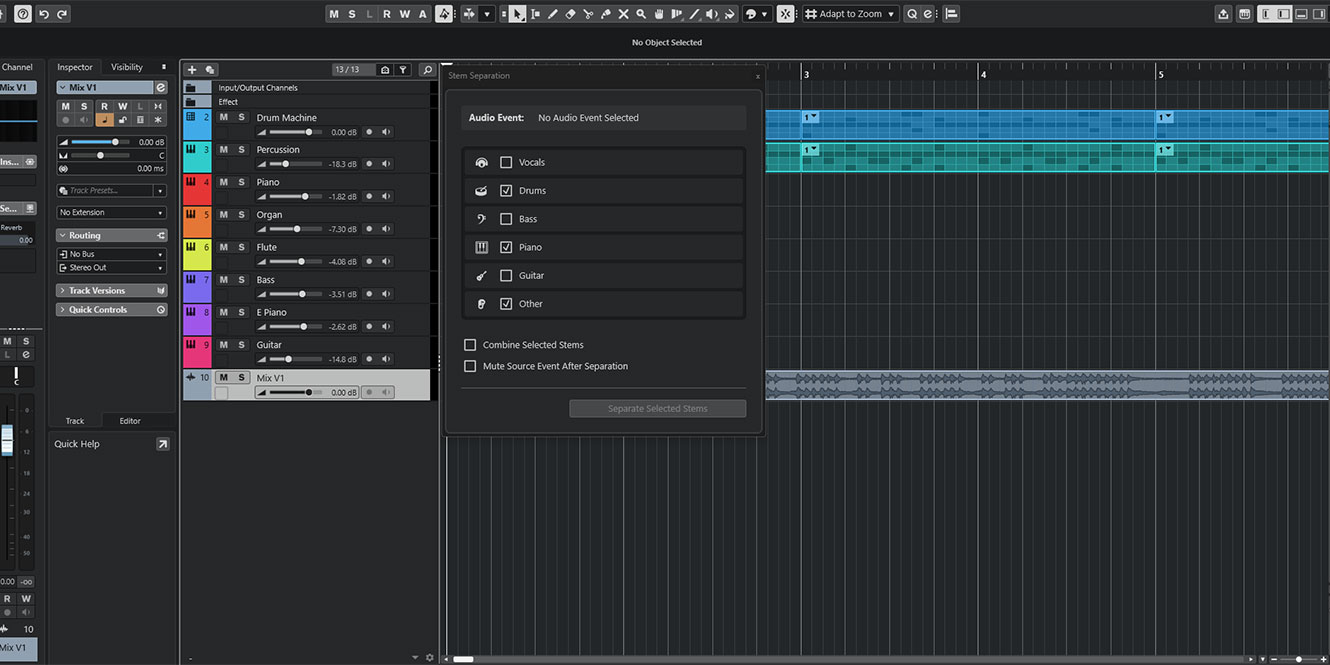
Although Steinberg promises improved results, the updated algorithm will need to be tested against Cubase 15 to establish how significant the improvement actually is. Nevertheless, the expanded instrument categories are a welcome development and make the feature considerably more versatile.
New MIDI editing tools: more expressive performances
MIDI editing has always been one of Cubase’s strengths, and version 16 introduces two particularly useful additions: Strum and Stretch Selection.
Both are designed to make manipulating MIDI performances quicker and more intuitive.
Strum
The new Strum function in the Key Editor lets you adjust the timing of notes within a chord to create more natural, expressive performances.
When you programme chords using a mouse, the notes typically start simultaneously. While this works for certain instruments, it can sound unnatural when programming guitars, pianos, and other instruments that benefit from slight timing variations.
Strum addresses this by spreading the notes across time, helping you create more convincing performances.
You can introduce subtle movement to a chord progression or exaggerate the effect for more pronounced rhythmic patterns.
It’s a simple idea, but one that could remove the need to manually reposition individual notes.
Stretch Selection
Stretch Selection is another useful approach to MIDI editing, allowing you to stretch or compress selected notes directly within the Key Editor.
Rather than manually adjusting every note, you can change the timing and duration of an entire passage. This could be useful when fitting a melody into a shorter musical phrase, extending a chord progression or experimenting with rhythmic variations.
You can even use it to create accelerandos and ritardandos without changing your project’s overall tempo.
Together, these tools offer small but meaningful improvements, particularly for composers or electronic musicians who regularly work with programmed MIDI instruments.
Improved Tempo Detection and Spectral AudioWarp
Cubase 16 also introduces important improvements for mixing engineers working with recorded audio.
The redesigned Tempo Detection workflow promises more accurate analysis with fewer steps, making it easier to identify the tempo of imported recordings. This is especially useful when working with performances recorded without a click track, where the tempo naturally fluctuates.
Rather than manually aligning every section, the new detection algorithm can analyse the recording and apply its timing information directly to your project’s Tempo Track – a huge relief and time-saver for mixing engineers!
The update is complemented by new Spectral AudioWarp modes, developed by Steinberg’s HALion team. These introduce additional time-stretching and pitch-shifting algorithms designed to preserve useful sound quality even when applying extreme adjustments.

Beyond conventional editing, the new modes open up creative opportunities for transforming recorded material. Why not experiment with stretching a short vocal phrase into a long, evolving texture could provide an interesting starting point for ambient music or cinematic sound design.
Elsewhere, the former Musical Mode has been renamed Follow Tempo.
New Instruments, Effects, and Sounds
Cubase 16 expands its collection of included sounds and processing tools, introducing several additions for songwriting, sound design, and mixing.
Omnivocal Basic
One of the more unusual additions is Omnivocal Basic, powered by Yamaha’s Omnivocal NX vocal synthesis engine.

Featuring two included voicebanks, the instrument allows you to generate singing voices directly within Cubase – think along the lines of the old Vocaloid-style plugins, but modern and not designed to mimic the sound of anime characters.
Though Omnivocal will never replace your singer, this new upgrade offers an interesting way to develop vocal melodies and experiment with arrangements without recording a singer.
The new Lyrics functionality in Cubase 16’s Key Editor works hand-in-hand with Omnivocal, letting you enter, edit and align lyrics alongside MIDI notes. A dedicated Lyrics lane also supports pronunciation and language settings, providing additional control over vocal phrasing for users around the world.
If you need more options, Omnivocal Pro is available separately with ten voicebanks.
Module
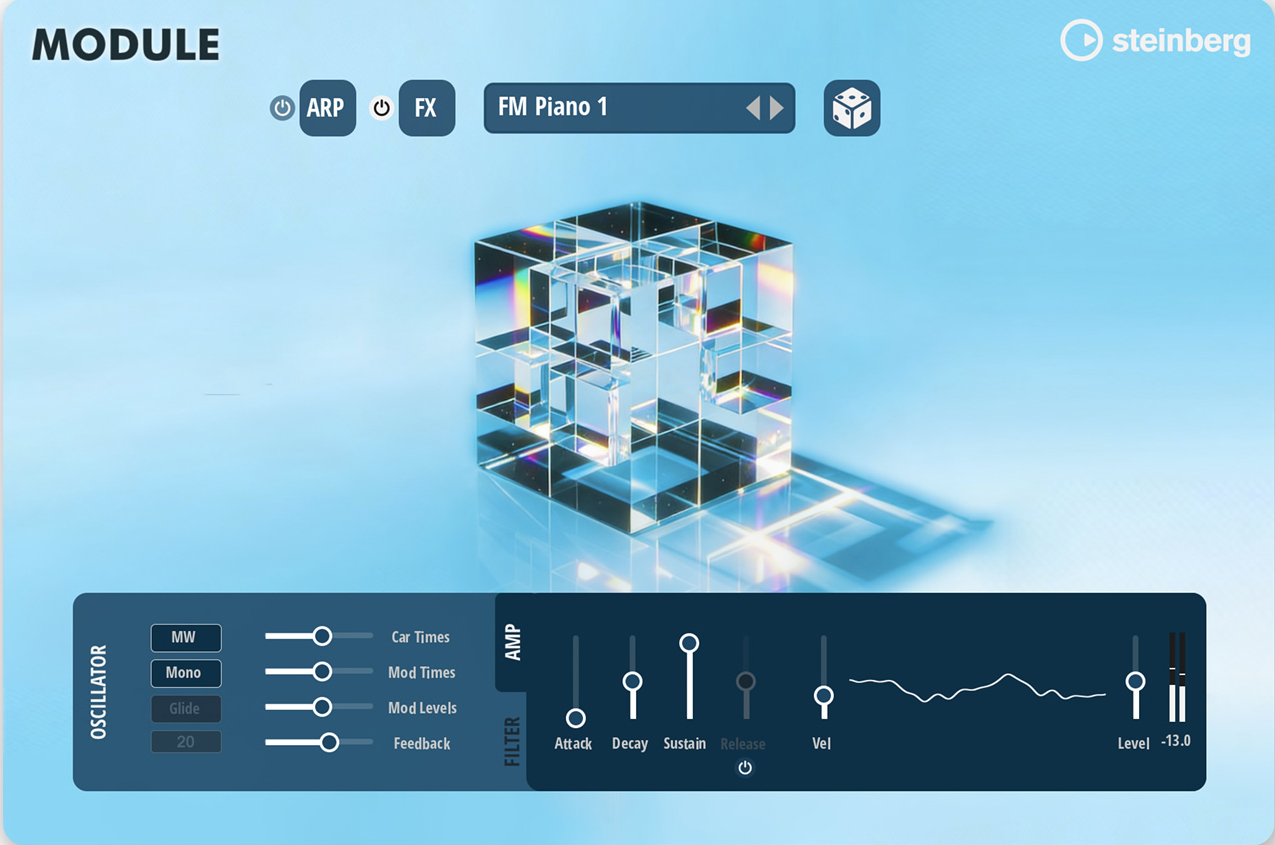
Developed by Steinberg’s HALion team, Module is a new HALion Sonic library based on the FM Lab synthesis engine.
It includes more than 200 presets, covering leads, keys, basses, and atmospheric textures.
Rather than demanding extensive programming, Module focuses on immediately usable sounds that can provide a starting point for songwriting and production.
DrumChain and VocalTouch
The two new headline effects in Cubase 16 are DrumChain and VocalTouch. These new plugins simplify common mixing tasks.
DrumChain combines essential drum-processing tools within a single interface, helping you shape punch, clarity, and low-end weight without constructing elaborate processing chains.
It includes 42 presets covering different drum-processing applications.

VocalTouch follows a similar approach for vocal production, providing convenient processing options and 30 presets across 15 vocal styles.
Both could be particularly useful for musicians who want to achieve polished results without spending extensive amounts of time configuring individual plugins.

New Sound Content
Cubase 16 also introduces five sample packs created in collaboration with Wavetick, covering Afro House, Beats & Breaks, K-Pop, Latin Vibes, and Organic Sessions.
These add fresh loops and sounds for building arrangements and experimenting with different genres.
There’s also integration with Waves Illugen, allowing producers to generate custom samples and import them directly into Cubase through the Right Zone.
A complimentary two-month Illugen subscription voucher is included for Cubase 16 users.
Workflow improvements: the changes you’ll notice every day
Some of Cubase 16’s developments aren’t necessarily its most exciting — but they’re useful! For example, we have a redesigned Settings workspace which brings preferences, key commands, project setup, and audio connections into one searchable location.
Previously, adjusting different configuration options could involve navigating several menus and windows. Now, the non-modal workspace allows you to make adjustments while continuing to work on your project.
The mixing workflow has also received several improvements. Cubase 16 supports up to 16 audio sends per channel, doubling the previous limit! This provides additional flexibility when building complex effects chains, using parallel processing or configuring extensive sidechain routing.
Drag-and-drop functionality has been expanded, allowing you to move or copy insert effects, Channel Strip modules and Modulators between tracks and channels.
You can also drag an insert effect into an empty area of the Track List to create a new FX Channel.
It’s a small change, but one that could save time during busy mixing sessions.
Elsewhere, Cubase 16 introduces improved plug-in management, customisable MIDI controller names, and a redesigned Audio Pool.
Key commands can now be assigned directly from supported context menus, removing another reason to interrupt your workflow.
For larger projects, synchronised folder visibility between the Track List and MixConsole should make navigation more consistent.
Performance hasn’t been overlooked, either. Extended ASIO-Guard increases the available pre-processing buffer to 280 milliseconds, potentially providing greater playback stability in demanding projects.
This won’t necessarily improve every system or workflow, but it could help producers working with large numbers of virtual instruments and CPU-intensive effects.
Additional features worth knowing about
Cubase 16 includes several further improvements that deserve a mention, even if they don’t warrant dedicated sections.
Ableton Link support enables tempo, beat, and transport synchronisation between compatible applications and devices over a local network. This is particularly useful for collaborative sessions and electronic music setups.
Expanded MIDI 2.0 functionality introduces support for Note Expression controllers and Note On Orchestral Articulation messages, providing more detailed control when using compatible instruments.
For newcomers, Quick Help offers contextual explanations directly within Cubase, while a new Guided Tour introduces the main areas of the Project Window.
There are practical improvements, too. New pitch detection and phase inversion options in Sampler Track and Drum Machine make sample editing and layering easier, while expanded MPEG-4 import compatibility supports audio recordings from mobile devices.
Finally, improvements to the video engine, MIDI Remote integration, and plug-in interfaces help bring Cubase’s wider production environment up to date.
Who is Cubase 16 suited to?
Cubase 16 is certainly comprehensive, and you’ll probably benefit from some of the new features more than others.
For beginners, the redesigned Settings workspace, Guided Tour, and Quick Help system should make navigating Cubase less intimidating. However, its extensive features and advanced editing capabilities are definitely a learning curve.
For electronic music producers, Instrument Stacks, expanded Stem Separation, Spectral AudioWarp, and Ableton Link provide plenty of opportunities for creative experimentation.
For composers and professional producers, improvements to MIDI editing, Instrument Stacks, articulation handling, and larger project workflows could be particularly appealing.
If you’re a musician just looking for a DAW for straightforward recording, however, you might find that Cubase 16 overcomplicates the process a little.
Is Cubase 16 worth upgrading to?
The biggest question surrounding any new DAW version release is: Do the new additions justify an upgrade from a previous version?
After all, Cubase is already a mature DAW, having been around since the dawn of computer recording, meaning every new release needs to offer something beyond a longer feature list.
Looking at the improvements introduced in Cubase 16, for my money, the clearest benefits appear to be in workflow efficiency.
Instrument Stacks simplify a process that previously required more preparation. Expanded Stem Separation offers greater flexibility when working with existing recordings, and the new MIDI editing tools make common adjustments quicker.
These aren’t necessarily features that transform the entire DAW, but they address practical aspects of music production that long-time users have no doubt had their gripes with in previous versions of the DAW.
If you regularly build layered instruments, manipulate recorded audio, or work extensively with MIDI, I would say upgrade — especially if you’re using Cubase 14 or earlier. You’ll gain access to improvements accumulated across several releases, rather than judging the purchase purely on Cubase 16’s additions.
It’s also encouraging to see Steinberg improving everyday usability rather than concentrating exclusively on headline features – something that power users are typically more keen to see as the DAW already offers more than any music-maker could ever need.
Specifications
| Mac | Windows | |
|---|---|---|
| Operating System | macOS Golden Gate (27), macOS Tahoe (26), macOS Sequoia (15) | 64-bit Windows 11 (version 25H2 or higher) and 64-bit Windows 10 (version 22H2 or higher) |
| CPU | IntelCorei5 (2018 or later) or Apple silicon (Native App and Rosetta 2 App) | IntelCorei5 (8th Generation) or AMD Ryzen Series-3000 or Windows on Arm processor |
| Graphics | Graphics card with Metal support | Graphics card with native Windows 10 support (Microsoft Basic Display Driver is not recommended) |
| Display Resolution | 1440 x 900 | 1440 x 900 |
| Disk Space | 89GB (Full installation) | 89GB (Full installation) |
| RAM | 16GB | 16GB |
FAQs
Is Cubase difficult to learn?
Cubase is relatively difficult to learn for beginners new to production because of its extensive professional features. Its advanced recording, mixing, and MIDI tools take time to master. However, beginner tutorials and intuitive project templates help simplify learning.
Which is better, Cubase or FL Studio?
Cubase is better for recording, mixing, and orchestral production, while FL Studio excels at beat-making and electronic music. Cubase offers advanced audio editing and scoring tools, whereas FL Studio provides a faster, pattern-based workflow.
Is Cubase free to use?
Cubase is not free to use, though Steinberg offers 60-day free trials of all versions of Cubase. In addition, stripped-down versions of Cubase LE and AI are included with the purchase of specific hardware products from Steinberg and Yamaha.
Final thoughts
Cubase 16 builds on an already powerful DAW with a combination of new creative tools and thoughtful workflow improvements.
Instrument Stacks, expanded Stem Separation and improved MIDI editing are among its most interesting additions, while new instruments, effects and streamlined configuration tools strengthen the overall package.
Ultimately, after reviewing Cubase 16, I believe Steinberg has focused less on reinventing music production and more on making established workflows faster, easier and more flexible – and that’s not a bad thing.




0 Comments