



Piano apps can be incredibly helpful for players who benefit from non-traditional learning methods. They’re a great option if you prefer to learn at your own pace and independently, or if you’re looking for additional support to complement your lessons.
There are many types available; some are designed for complete beginners, some for kids, and others are for intermediate-level pianists who want some extra exercises to aid their progress. In this article, we look at the best piano learning apps on the market and discuss how to choose one that suits your learning style.

In a hurry?
Here are our top three piano learning apps.
App Overview
Flowkey A great all-rounder, particularly suited to beginner pianists who want to learn songs at a steady pace.
Skoove With a lesson-focused approach, Skoove is ideal for structured learning.
Tomplay Ideal for pianists wanting to read sheet music... while being accompanied by a full ensemble!
Why we’ve chosen these apps
All these apps are super accessible. Most operate on a subscription basis, and some include a free trial when purchasing certain pianos.
After accessibility, we considered their feature set; we wanted to make sure every app has a variety of ways to keep you engaged and progressing, such as a good selection of songs and pieces to learn, different tuition methods, and numerous ways of receiving feedback. This keeps things creative. If you get bored with one exercise, you can simply move to another.
Of course, one of the most important things to think about when subscribing to a piano learning app is whether or not it’s actually reliable. Does it consistently get good reviews among new users? The apps on this list all tick that box. They help pianists a lot in those early stages, and some stick with players as they progress through more advanced levels.
The best piano learning apps
1. Flowkey – the best for learning songs
 A free trial to Flowkey is included with selected Yamaha purchases. The app is very easy to use and accommodates pianists in the very early stages of their learning, with features like Wait Mode allowing you to break down your playing while the app listens to you and shows the notes of the piece according to your pace.
You can also choose to practise with your hands playing separately or together.
In addition to the song learning section, the app includes a range of lessons covering music theory, chords, and sheet music. This is particularly useful, as these are the kinds of topics a tutor would typically cover – an app like this is the next best thing to one-to-one tuition.
Selected Yamaha digital pianos, such as the Yamaha P145BT Digital Piano With Bluetooth, include a three-month trial of Flowkey Premium. This is ideal for beginner players who want to start learning straight out of the box.
2. Skoove – the best for players looking for structured piano lessons
 Compared to some other apps on the market, Skoove is more focused on structured learning than simply playing along to your favourite songs. It features step-by-step lessons that are easy to follow, along with a real-time feedback function.
Much like a teacher, the app listens to your playing and provides feedback, tracking the notes you play.
Skoove offers two content tiers: a free version, which gives access to three lessons, and a premium plan that unlocks over 1,000 piano lessons, updated songs and tutorials, and full step-by-step courses.
The premium version requires a subscription, but considering the range of content included, you might find it worth the investment.
Looking for a piano upgrade? Alesis, Roland, and Kawai all offer trial subscriptions to Skoove; we’d recommend the Kawai CN201 Digital Piano.
3. Tomplay – the best sheet music-focused app
 Tomplay gives you access to a wealth of interactive sheet music. But not just that, it also makes solo practice feel like playing with a full ensemble.
Each piece comes with high-quality backing tracks recorded by professional musicians. It’s inspiring, and it encourages you to keep playing, as you’re practising with real accompaniment from the very first note!
Better still, the music library is eclectic. From Coldplay to Hans Zimmer, there are thousands of titles across a range of genres and skill levels.
Another very useful feature of Tomplay is automatic score scrolling, which helps you stay in time and focused on your playing. You can also adjust the tempo to suit your pace, whether you’re slowing things down to learn a new passage or building up to full speed.
Fingerings are shown on screen in real time, which is especially helpful.
Tomplay is available across devices, including iOS, Android, Mac, and PC, making it highly accessible. And for added flexibility, there’s a free 14-day trial, giving you the chance to explore its features before subscribing.
A wide range of selected Kawai models, such as the ES120 Digital Stage Piano, includes a three-month trial of Tomplay.
4. Casio Music Space – the best for complete beginners
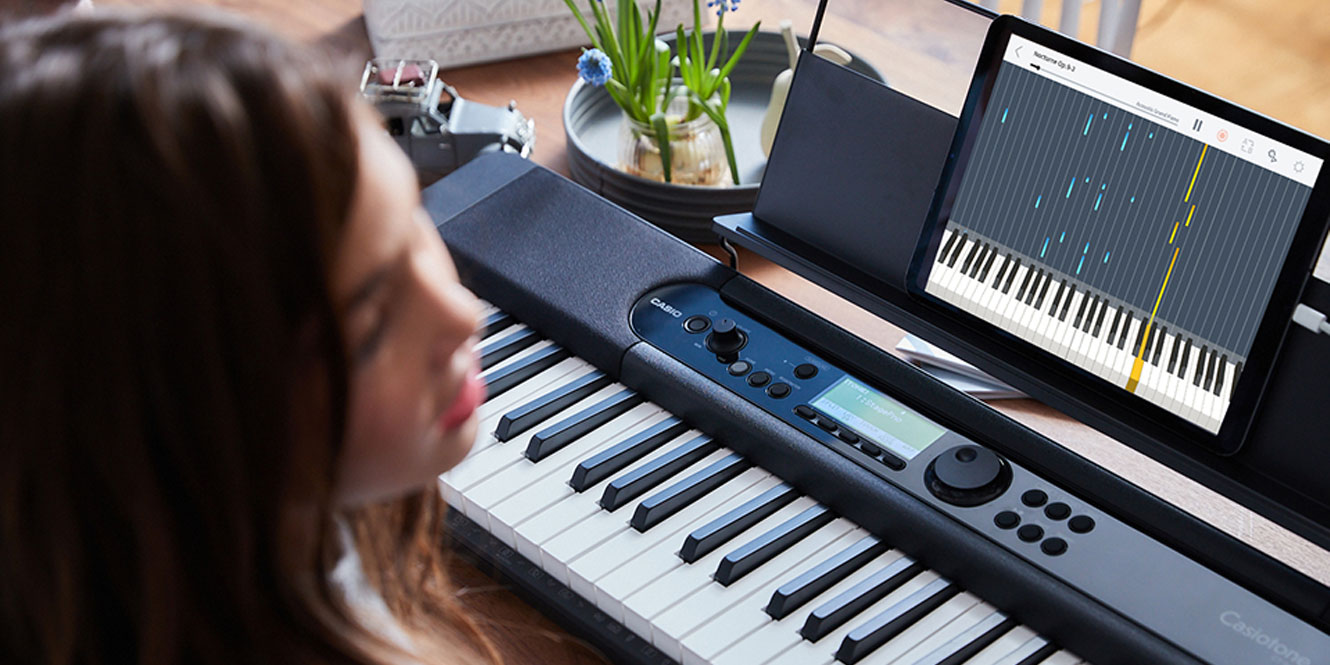
 Casio Music Space is a little different from the other apps on this list, as it has been designed specifically to enhance your experience with Casio digital pianos and keyboards. It offers a wide range of features aimed at supporting your practice and encouraging creativity in your playing.
The app includes Piano Roll mode, which visually guides you through each note, making it easier to play accurately even if you don’t read music. Notes are highlighted in real time, helping you connect what you see with what you hear and play.
Tempo and control are key parts of learning an instrument, and Casio Music Space aids your understanding and skill in these areas with several practice-focused features.
You can adjust the tempo, loop specific sections, and track your progress using built-in scoring and recording tools. If you’re learning at your own pace or returning to the piano after a break, these features offer a structured yet flexible way to improve.
The built-in score viewer and music player let you listen, follow along, and annotate your digital sheet music. Many songs are pre-loaded, and the app also supports your own MIDI files.
Casio Music Space is compatible with a wide range of Casio models, such as the Casio CDP S110 Digital Piano, and helps make your digital instrument feel more interactive, personalised, and rewarding to play. Check the Casio website for a full list of supported models.
5. Zapiano – the best for practical lessons
 Zapiano is an online piano course designed to make music accessible and enjoyable for learners of all ages. The course breaks down learning into manageable steps, helping you simplify the process and build a solid foundation.
It’s like having in-person tuition, but with the convenience of an app – great for anyone who wants to focus on the technical aspects of playing and develop their ability to read sheet music.
The course is led by Sven Haefliger, a piano teacher with over 25 years of experience, and features more than 1,500 instructional videos. Lessons on Zapiano feel personal and approachable, making the piano seem less intimidating.
Zapiano places particular emphasis on steady progress without pressure – ideal if you’re aiming to improve at a comfortable pace. Each concept is introduced gradually, allowing you to build confidence and understanding before moving on. Whatever stage you’re at, having friendly tuition that guides you without pressure is always a good thing.
Compared to other apps on the market, Zapiano is more focused on technique and sheet music than learning popular songs.
It’s available as a free trial with selected Kawai digital pianos, such as the CA901 Digital Piano. The trial includes a free introductory course, giving you a chance to explore the app and its teaching style.
6. PiaBookPlayer – the best for building a classical repertoire
 PiaBookPlayer is a free app from Kawai that enhances the built-in lesson features of your Kawai digital or hybrid piano. Created specifically for compatible models, the app allows you to view notated scores directly on your smart device and listen to professional playback through your instrument’s speakers.
The app is heavily focused on repertoire, with 370 classical pieces available, including works by Bach, Czerny, Chopin, and Hanon. This provides a wide variety of material to explore.
Scores are neatly organised by composer and book, making it easy to find what you need. Once you’ve selected a piece, you can play along while reading the digital score or save your favourites for quick access later.
One of its most helpful features is hands-free page turning. You can turn pages using the piano’s pedals, so there’s no need to take your hands off the keys. This is especially useful during longer pieces or exam preparation, where maintaining flow is essential.
Even if your instrument does not originally include the lesson function, PiaBookPlayer can still unlock that content, making it useful across a broad range of Kawai models.
The app is compatible with a range of Kawai digital pianos, such as the Kawai CX-202 Digital Piano. You can find the full list of supported models on the Kawai website.
7. Smart Pianist – the best variety of piano types and environments
 Smart Pianist is Yamaha’s dedicated app for compatible digital and hybrid pianos. It gives you access to a library of up to 400 built-in songs, complete with digital scores, and the option to add your own PDF sheet music. The app can generate chord charts and reference audio to support your practice.
If you’re using a CSP Series, CVP Series, or P-S500, you can also enable automatic accompaniment that follows the mood of your playing.
One of the app’s strengths is how it streamlines practice. You can isolate hands, adjust the tempo, cancel parts, and record your sessions. This allows you to work through tricky sections slowly, then build confidence at your own pace.
You can also swipe through different piano types and performance venues, such as concert halls or clubs, to create a more immersive playing experience. And it’s not just piano that’s available to you – you can choose between a wide range of instrument voices, from classical grand pianos to electric bass or strings, which can be layered or split between the hands.
For supported models, there’s even a virtual backing band with up to 500 accompaniment styles across genres such as rock, jazz, and Latin.
The Smart Pianist app is compatible with selected Yamaha models, such as the Yamaha P225 Digital Piano.
8. Melodics – the best for contemporary music styles
 Melodics focuses on MIDI keyboard learning and is ideal if you’re looking to improve your skills in genres such as pop, hip-hop, or electronic music.
Rather than using traditional sheet music, Melodics presents a clear visual layout that guides you note by note, making it a great fit for aspiring producers or anyone who learns by ear.
The app offers a structured learning path with lessons in theory and technique, alongside over 500 song tutorials. You can break down your favourite tracks, loop difficult sections, and adjust the tempo, and each lesson provides real-time feedback, helping you track your progress and stay motivated.
It doesn’t teach traditional music reading, but it helps you develop rhythm, finger control, and musical awareness in a fun and interactive way. The app also has a strong focus on drum lessons.
9. Pianote – best for direct learning
 Pianote is a great option if you’re looking for an app that’s fun to use and feels genuinely personable. It offers the kind of guidance you might expect from in-person lessons. Simply set your goals, follow the video lessons, and get support from real teachers, adding a valuable human touch to your learning.
This level of interaction is an important part of the process. It encourages you to apply real feeling and emotion to your playing, while also allowing you to draw inspiration from your teachers. Pianote excels in this area, featuring recognised instructors who are active in the music industry.
The app not only gives you access to lessons and real teachers, but also provides a clear guide on what you should be practising. This is particularly useful if you’re learning independently. For some players, a lack of structure can be a stumbling block, so having a defined path can really help you make consistent progress.
Although Pianote is primarily lesson-focused, it also allows you to learn your favourite songs, with over 500 available in the Pianote library.
How to choose the best piano learning app for you
First, you need to know what you want to get out of your practice. Some apps are geared towards reading sheet music, others help you play along with popular songs, and a few offer structured lessons with feedback. Think about what motivates you and where you’d like support, whether it’s learning to improvise, building technique, or simply enjoying your favourite tunes.
It’s also worth checking compatibility with your digital piano. Certain apps, like Smart Pianist or PianoRemote, are designed specifically for Yamaha or Kawai instruments. These can unlock features on your piano that would otherwise be inaccessible. If you own a model from another brand, choose an open-platform app, such as Tomplay or Pianote.
Finally, consider your budget. Some apps include a free tier or trial period, while others work on a monthly subscription. If you’re just getting started, it might be helpful to try a few free lessons before committing.
FAQs
Do piano apps really teach you piano?
Piano apps can be very effective in teaching piano, as they guide you through lessons, technique, and song practice with interactive feedback and structured progression. They offer convenience and support foundational skills, but the best results come from combining apps with practice and, if possible, a teacher.
Is Skoove piano free?
Skoove piano is free to start with basic lessons and features, but access to its full library and advanced content requires a paid subscription. The free tier helps beginners explore fundamentals, while the premium option unlocks deeper learning and extended repertoire options.
What is the 80/20 rule in piano?
The 80/20 rule in piano means focusing on the 20% of skills or pieces that produce 80% of your progress. Prioritise essential techniques, patterns, and repertoire that improve overall ability quickly, rather than spreading effort thinly across every possible exercise.
Final thoughts
The best piano learning apps allow you to learn from the comfort of your own home while genuinely helping you progress in skill. There are plenty of options available to help you with technique, sight-reading, and music lessons. But remember, you should always pair the app with regular practice – consistency is key!


0 Comments